Template
Obituary templates
Writing an obituary is hard when you are grieving.
Download the template
Download everything
Blank and worked example, in Word and PDF, in one ZIP file (421 KB).
How to use it
- Gather the key facts: full name, dates, family names and funeral details.
- Write the announcement first, with the name, date and a simple statement of loss.
- Add a few memories, such as a job, a hobby or something that made people smile.
- Check names, dates and spellings with the family.
- Check any word limit and cost with the newspaper or funeral director before you submit.
About this template
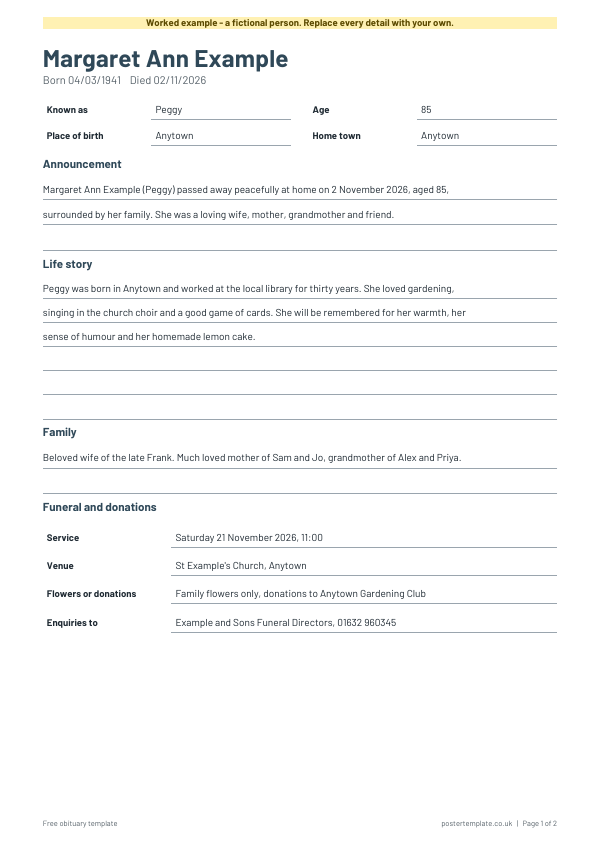
This free template gives you a simple structure, so you can concentrate on the words: an announcement, a short life story, the family and the funeral details. The worked example shows how the sections fit together. Download it as a Word file to type into, or as a PDF to write by hand. Use it for a newspaper notice, an online tribute, an order of service or a family keepsake. Take your time, and ask someone to read it before you share it.
Questions
What should an obituary include?
The full name, dates, a short life story, family, and the funeral details. Many also include where to send flowers or donations.
How long should an obituary be?
Newspapers may have a word limit or a charge for notices, so check with the paper first.
Who writes it?
Usually a close family member or friend, sometimes with help from the funeral director.
Where can I get help after a death?
The funeral director can help with notices. GOV.UK has guidance on what to do after someone dies.
Related templates
 Certificate of appreciation templates
 Newsletter templates
 Personal reference letter template
 Flyer templates
Free, no sign-up. Edit the Word file or print the PDF. All templates