Household template
Bill tracker templates
A bill tracker keeps your regular payments in one place, so you can see what is due, what is paid and what is still to come.
Download the household template
Download everything
All 2 versions, in Word and PDF, in one ZIP file (856 KB).
How to use it
- List your regular bills, who each one is with and the usual amount.
- Add each due date, copying it from your bill or agreement.
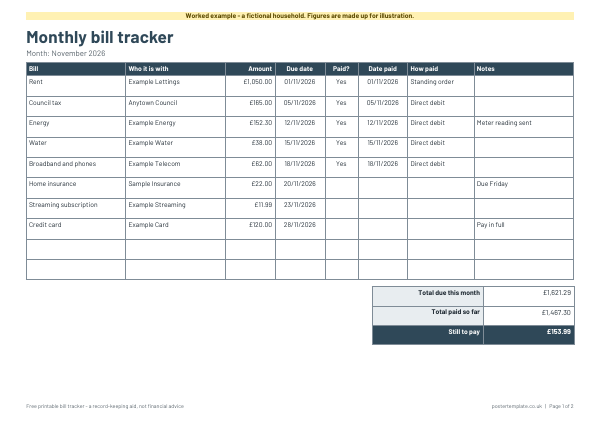
- Tick or colour the bill when you have paid it. On the monthly version, add the date and how you paid.
- Add up the month's totals at the bottom of the monthly tracker.
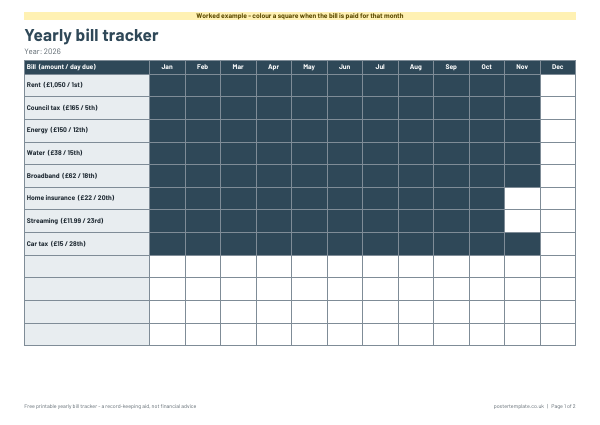
- Print a fresh monthly page each month, or keep the yearly chart on the wall for the whole year.
About this household template
This free printable pack has two versions. The monthly tracker is a table for the bill, who it is with, amount, due date, paid tick, date paid, payment method and notes, with totals underneath. The yearly tracker is a chart with a row for each bill and a square per month to colour in once paid. Both are Word files to type into and PDFs to print, with worked examples using made-up figures. They record your own information and are not financial advice.
Questions
Is this financial advice?
No. It organises information you already have. If you are finding bills hard to manage, free help is available from MoneyHelper (moneyhelper.org.uk) and Citizens Advice (citizensadvice.org.uk).
Should I use the monthly or the yearly tracker?
The monthly tracker gives you detail, such as amounts and dates. The yearly chart gives you a quick overview. Many people use both.
Can I edit the bill names?
Yes. Type into the Word version, or write on the printed PDF.
How often should I update it?
Whenever a payment goes out or a bill arrives. Even a weekly check helps you spot a missed payment early.
Related templates
 Budget planner template
 Savings tracker template
 Weekly planner templates
 Shopping list templates
Free, no sign-up. Print it and fill it in by hand, or edit the Word file first. All household